Italian Electronic Invoicing for Business Central
Send, receive and preserve Italian electronic invoices without leaving Business Central. The app connects Business Central to the Sistema di Interscambio (SDI) through an accredited intermediary and automates the entire sales and purchase cycle, in compliance with Italian regulations (FatturaPA format).
The full sales and purchase cycle, inside Business Central
Post the document as you normally do. The app generates the XML, transmits it, records every SDI notification on the document and preserves the files. Operators handle exceptions only.
Sales
- Compliant XML files created automatically and sent to SDI for posted documents
- Automatic signing of all outbound XML files, including for public administrations
- Full support for public administration invoicing, including CIG and CUP codes
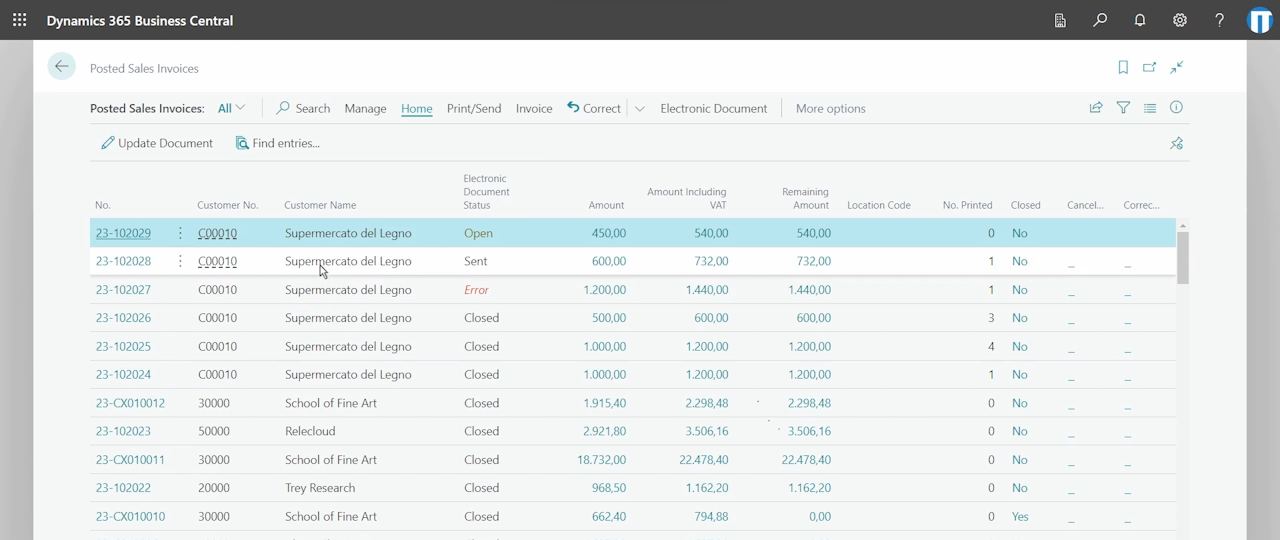
- Notifications from SDI synced automatically; the current status is visible on the document
- Preview before sending, both with style sheets and as XML
- The PDF print of the document can be embedded automatically in the electronic document XML
- Specific configurations for Amazon, stamp duty (bollo), withholding taxes and jobs
- Manual upload of ZIP and XML files when needed
Purchases
- Vendor documents loaded automatically in the system as document previews
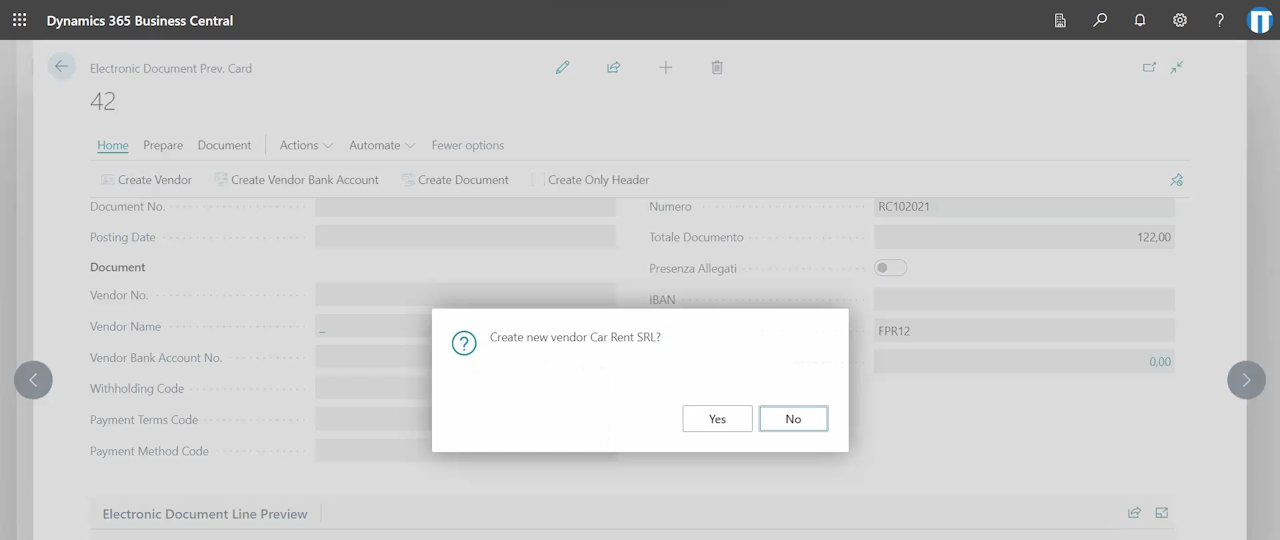
- Vendors and vendor bank accounts created directly from the received document
- Received documents viewed in a readable format with the AssoSoftware style sheet; vendor attachments downloadable
- Document lines compiled automatically, using rules, from the information in the electronic document
- Open purchase receipts matched against electronic documents, manually or automatically
- The full self-invoice and reverse charge process managed automatically
- Manual import of ZIP and XML files when needed
Monitoring and compliance
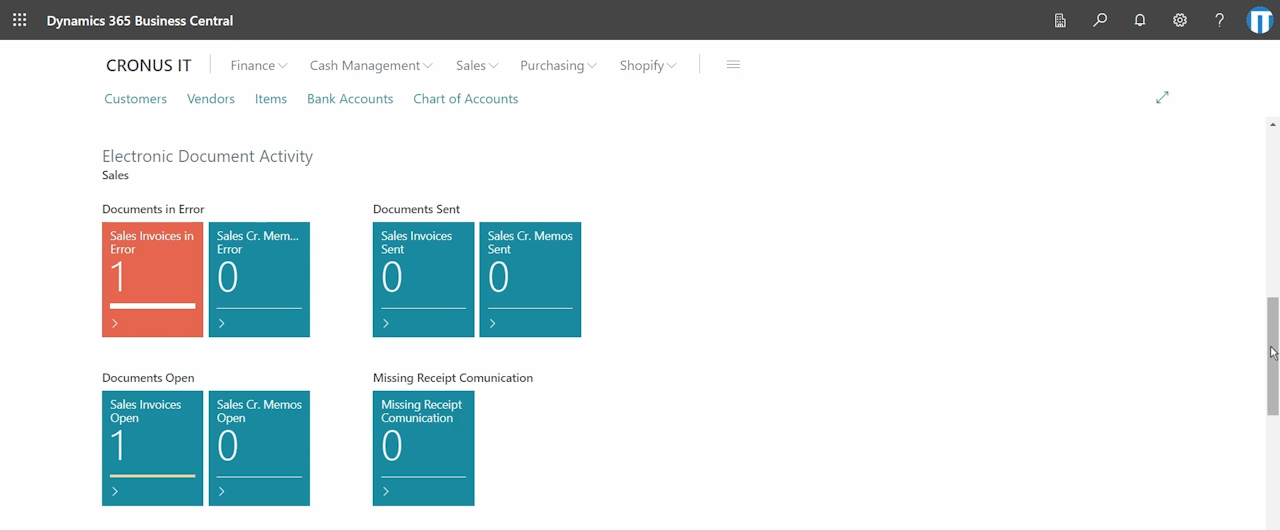
- Role center cues for the whole process; errors and rejections visible at a glance
- Detailed logs, document history and communication monitoring pages
- Rejected documents can trigger automatic email notifications
- All documents exchanged with SDI also available in a web portal
- XML files and notifications preserved for 10 years (conservazione a norma)
- AgID-certified intermediary; the connection runs directly between your environment, the intermediary and SDI
- Certified systems, compliant with privacy and GDPR requirements
Subscription and document packs
One subscription per tenant, valid for all companies. Documents are counted per legal entity; additional packs can be added at any time.
Subscription
| Scope | All companies in a single tenant |
| Included documents | 1,000 sales + 1,000 purchase per year, one legal entity |
| Implementation | 2 to 4 weeks from activation to go-live |
| Trial | 30 days, free |
| Languages | Italian, English |
Implementation services (configuration, training, go-live assistance) are quoted separately if required.
Additional document packs, per year
| Pack (sales + purchase) | Price |
|---|---|
| 1,000 + 1,000 | € 250 |
| 2,000 + 2,000 | € 350 |
| 4,000 + 4,000 | € 600 |
| 10,000 + 10,000 | € 900 |
Greater quantities are available at a decreasing unit cost. Contact us for volumes above 10,000 documents.
What Business Central offers as standard, and what our application adds
Microsoft's standard Italian electronic invoicing features compared with the application, point by point.
| Topic | Standard Business Central (Italian localization) | Our application |
|---|---|---|
| XML compliance | The standard XML covers only basic scenarios. Partial support for public administrations. | Ample support for a wide range of invoicing cases, including full support for public administrations. |
| Transmission to SDI | Sales invoices and credit memos are manually exported as FatturaPA XML files. Sending them to SDI requires manual upload of each file on the government portal. | XML automatically created and transmitted to SDI through the accredited intermediary. |
| Digital signature | Not included: exported files are unsigned, for public administrations the signature must be added manually using an external service. | All outbound files signed automatically, including public administration invoices. |
| SDI notifications | Not received in Business Central; delivery and rejection outcomes are checked outside the ERP. | Synced automatically; the current status and every event are visible on the document, with email alerts on rejections. |
| Vendor invoices | Reception of vendor invoices from SDI is not part of the standard localization. | Loaded automatically as document previews; vendors created from the document, lines compiled by rules, purchase order matching. |
| Self-invoices and reverse charge | The self-billing documents do not generate a valid XML file. | The full self-invoice and reverse charge process is handled automatically, TD16 to TD19. |
| Preservation | Not included. | XML files and notifications preserved for 10 years by the intermediary, included in the subscription. |
| Monitoring | No dedicated views. | Role center cues, communication history, detailed logs and a web portal with all exchanged documents. |
From activation to go-live in 2 to 4 weeks
- ActivationRequest the trial or the subscription; we activate the app on your environment and create the intermediary account for your legal entities. The app is installed from AppSource.
- SetupElectronic document setup, standard data (customers, vendors, VAT posting groups), vendor mapping rules. The documentation covers every parameter.
- TestSales and purchase documents exchanged in the test environment; notifications, self-invoices and public administration cases verified with your team.
- Go-liveRecipient code switched to the new channel, job queues scheduled, role center cues and email alerts configured. Support by the same team that develops the app.
Frequently asked questions
Does customer data pass through Memento's servers?
No. The connection runs directly between your Business Central environment, the intermediary's systems and SDI. Customer data never transits through servers or IT infrastructures owned by Memento.
How does the intermediary work?
The intermediary receives the documents from Business Central and manages the sending to and receiving from SDI, including the digital signature and the 10-year preservation. All exchanged documents are also available in its web portal. It is AgID-certified and compliant with privacy and GDPR requirements. The account is included in the subscription.
How are documents counted?
Each sales document sent and each purchase document received counts once, per legal entity and per year. The subscription includes 1,000 + 1,000 documents; packs cover higher volumes and can be added when needed.
Does the app cover invoices to the public administration?
Yes. Public administration invoices are generated with CIG and CUP codes, signed automatically and transmitted through the intermediary. Outcomes from the administration are recorded on the document.
Can I use the app for several companies?
Yes. The subscription is valid for all companies in a single Business Central tenant. Documents are counted per legal entity.
Is the app available in English?
Yes. The app and the documentation are available in Italian and English, which makes it suitable for international groups rolling out Business Central to an Italian subsidiary.
How do I start the trial?
Request it through the contact page, or write to appsource@mementoas.com. We activate the app on your environment for 30 days, with the complete functionality; the app is installed from AppSource. Details on the activation process are in the documentation.
Start with the 30-day trial
Request the trial and we activate the app on your environment; the app itself is installed from AppSource.